Showing posts with label PHP. Show all posts

Wednesday, May 21, 2025

In PHP, "false" can be true

All values loaded from an environment (.env) file using vlucas/phpdotenv are treated as strings, regardless of how they appear in the file. Even if your .env file contains IS_IN_SANDBOX_MODE = false, $_ENV['IS_IN_SANDBOX_MODE'] will be "false". The following condition would evaluate to true, even though the variable in the .env file is set to false, because "false" is a non-empty string and thus truthy in PHP:

if (IS_IN_SANDBOX_MODE) --> if ("false") --> true

This is a common gotcha when working with environment variables in PHP. To address this, you can use:

define('IS_IN_SANDBOX_MODE', filter_var($_ENV['IS_IN_SANDBOX_MODE'],
    FILTER_VALIDATE_BOOLEAN));

Note that FILTER_VALIDATE_BOOLEAN will return null for values like "True", "FALSE", "TRUE", etc. if (null) evaluates to false. It will return true for "true" (lowercase), "1", "on", or "yes". It will return false for "false" (lowercase), "0", "off", "no", or an empty string "".

Alternatively, my personal preference (because it makes the string conversion explicit):

define('IS_IN_SANDBOX_MODE', $_ENV['IS_IN_SANDBOX_MODE'] === 'true');

Or, when using it in a condition:

if (IS_IN_SANDBOX_MODE === 'true')

Monday, December 2, 2024

Interpreted vs compiled programming languages

With an interpreted language like Python or PHP, if you notice a bug in the web app API logic or the UI script, you can fix it and test the change immediately. This is much faster than stopping to recompile and deploy every time, as would be required in a compiled language.

Without compiled binaries, the same source code can be deployed on multiple platforms without adjustments, as long as the runtime environment is consistent.

Many modern web frameworks (e.g., Flask, Laravel Vite) have features like "hot reloading," which automatically detect changes in code and reload the application without restarting. This is much easier to implement in interpreted environments.

While these advantages are significant, they may come at the cost of runtime performance and error detection, as compilation often catches errors early. However, for most web applications, the increased development speed and flexibility usually outweigh these trade-offs.

Music: The Cardigans - My Favorite Game

Friday, November 29, 2024

Base64 encoding

Base64 encoding ensures that the output only contains characters from a specific, limited set of 64 characters, which are: ABCDEFGHIJKLMNOPQRSTUVWXYZabcdefghijklmnopqrstuvwxyz0123456789+/

It is safe for most text-based systems because none of the potentially problematic characters (\, \0, \n, \r, \x1a, ', ") appear in the output. Note that \x1a is the hexadecimal representation of the ASCII control character SUB (substitute). It is a non-printable character with the decimal value 26 in the ASCII table. If included in a text string, \x1a is typically invisible and may disrupt processing, especially in legacy systems that interpret it as EOF.

Example:

Base64 encoding increases the size of the input data by approximately 33%. Specifically: For every 3 bytes of input, base64 adds 4 characters. For example if input JSON is {"customer_id":123,"email":"user@example.com","nonce":"d1a2b3c4d5e6f7g8h9i0j1k2l3m4n5o6"}, which is 94 characters, the output will be eyJjdXN0b21lcl9pZCI6IDEyMywgImVtYWlsIjogInVzZXJAZXhhbXBsZS5jb20iLCAibm9uY2UiOiAiZjVkMGMzZGY3ZTM3ODQ2NWQ0NjhkMTdjZTRhNGNlMzIifQ==, which is 128 characters. Note the "==" characters at the end. These are used for padding which ensures the length of the encoded string is a multiple of 4. If your database column to hold the token is VARCHAR(255), assuming a max customer_id of "999 999 999", max email size should not exceed 111 characters.

Email max lengths [RFC 5321, Simple Mail Transfer Protocol]:

  • Local part (before the @): Up to 64 characters (octet = byte).
  • Domain part (after the @): Up to 255 characters.

Total length: The maximum length of a valid email address is 320 characters, but this is extremely rare in practice.

Music: Barış Manço - Dönence

Sunday, November 17, 2024

Data Transfer Objects

Data Transfer Objects (DTOs) decouple the internal structure of your models, entities, or database schema from the data exposed to the external world (e.g., APIs, front-end). They serve as a contract for the data being transferred, which helps ensure that changes in your data layer don't inadvertently affect the consumer.

Another benefit of DTOs is to enforce structured data and eliminate errors from missing [string] keys. By using a constructor, you control how the raw data is mapped. If a key is missing, you can provide a default value or handle the absence gracefully or you can add validation logic centrally in constructor. Using DTOs allows tools like PhpStorm or VSCode to identify missing properties during development. When working with arrays, typos in keys can go unnoticed until runtime, with DTOs you are using object fields which don’t have this weakness. Example without DTO (note the usage of error prone string keys):

private function prepareProductDetails(array $product): array {
        $product['photos'] = $this->processProductPhotos($product['photos']??[]);
        $product['tr_currency_formatted'] = isset($product['deposit']) 
                ?Currency::formatTRY($product['deposit'])
        return $product;
    }

With DTO:

class ProductDetailsDTO {
    public array $photos;
    public ?float $deposit = null;
    public ?string $tr_currency_formatted = null;
    public function __construct(array $data) {
        $this->photos = $data['photos'] ?? [];
        $this->deposit = $data['deposit'] ?? null;
    }
    public function setFormattedCurrency(callable $formatter): void {
        if ($this->deposit !== null) {
            $this->tr_currency_formatted = $formatter($this->deposit);
        }
    }
}

Note the usage of object fields instead of string keys:

private function prepareProductDetails(array $product): ProductDetailsDTO {
    $productDTO = new ProductDetailsDTO($product);
    $productDTO->photos = $this->processProductPhotos($productDTO->photos);
    $productDTO->setFormattedCurrency(fn($amount) =>
        Currency::formatTRY($amount));
    return $productDTO;
}

Sunday, September 22, 2024

What tech to use when you are just starting

In the beginning, you are trying to find out if there is a need for your app, which means you personally have to find people to try your app. Since there is no marketing, there is no sudden spike in traffic you have to think about. Therefore, you should aim for quick prototyping instead of scalable solutions. Here is a list with the complex option in the first column and simpler option in the second:
# complex simple
1 Mobile app Progressive Web App (PWA)
2 MySQL/PostgreSQL SQLite
3 Queue worker defer()
4 Broadcast with events Echo whisper
5 Mailgun PHPMailer + gmail
6 ElasticSearch SQL queries
The simpler options also use less resources which means that you can host your app on a cheap VPS for 10$/month.

Thursday, August 22, 2024

Adventures with PHP & Laravel

I am updating a demo chat app written with the Laravel framework using Reverb. I must say, it takes some getting used to, as a lot of things happen behind the scenes, using certain naming conventions and strings, and you are not able to follow it with ctrl+click from PhpStorm. Laravel uses Convention over Configuration, i.e. it expects you to follow certain naming conventions.

To run the app locally, you have to open 4 terminals and run:
  1. php artisan serve starts a built-in development server for your Laravel application. It's a convenient way to test and develop your application locally without the need for a full-fledged web server.
  2. php artisan queue:listen initiates a worker process to listen for and process jobs in your Laravel application's queue. It's crucial for background tasks, email sending, and other time-consuming operations.
  3. php artisan reverb:start initiates the Laravel Reverb WebSocket server, enabling real-time communication between your Laravel application and clients.
  4. npm run build optimizes the code for performance, minifies it, and bundles it into a single file or multiple files, making it suitable for deployment to a web server.
Passing a variable from controller to blade view:
Controller passing $users to view:
$users = User::where('id', '!=', Auth::id())->get();
return view('proceed', compact('users'));
Using $users in view:
<select id="userSelect" class="form-control">
  <option value="" disabled selected>Select user...</option>
  @foreach($users as $user)
    <option value="{{ $user->id }}">{{ $user->name }}</option>
  @endforeach
</select>

Naming conventions are very important. For example, if you want to use parameters in routes/channels.php, you have to use the following syntax:
Broadcast::channel('channelBetweenUsers.{user1_id}.{user2_id}', function ($user, $user1_id, $user2_id) {
    return (int) $user->id === (int) $user1_id || (int) $user->id === (int) $user2_id;    
});
The call order is broadcastOn(), new PrivateChannel("channelName") → routes/channels.php, Broadcast::channel("channelName"). If there is no matching channelName in routes/channels.php, the communication will fail.

The $user1_id, and $user2_id parameters are passed by broadcastOn() in new PrivateChannel call parameter. $user represents the authenticated user and is always available. The other parameters, $user1_id and $user2_id, are extracted from the channel name and passed to the callback function in Broadcast::channel(...). 

Laravel accessor methods allow you to define logic that will be executed when an attribute is accessed, enabling you to perform calculations, transformations, or other operations before returning the value. PhpStorm will mark them with "no usages".

Frontend (with React) rendering call order: HomeController.php → home.blade.php → app.blade.php → app.js → Main.jsx → ChatBox.jsx → Message.jsx, MessageInput.jsx

Middleware is a mechanism to intercept and modify HTTP requests before they reach the application's routes and controllers. It provides a flexible way to implement cross-cutting concerns like authentication, authorization, rate limiting, logging.

The __() function is a Laravel helper function used for translating text. It looks up the given key (e.g. {{ __('Logout') }}) in the localization files and returns the appropriate translation based on the current locale, e.g. 'Çıkış'.

When you want to execute a job sending and receiving messages asynchronously, you can use queues. A queue driver acts as a bridge between your Laravel application and the underlying queue system. It handles the communication and management of tasks or jobs that are placed on the queue. A queue worker is a process that continuously monitors the queue for new jobs. Once a job is available, it processes the job and removes it from the queue. The simplest way is to use the database as a queue driver. However, database operations, especially writes, can be relatively slow. Using a database as a queue driver could introduce noticeable delays in message delivery, especially as the number of users and messages increases. But until you pass 100 users messaging each other in the same time frame (concurrent), a database can handle it.

For higher concurrent messaging, you can use Redis as your queue driver, which is an in-memory data store that excels at handling high-throughput, low-latency tasks. But it adds to setup complexity because you have install the Redis server and configure it (hostname, port, authentication). You still need to issue php artisan queue:listen command to connect the Redis queue to your app.

While RabbitMQ can also be used for chat applications, it might introduce unnecessary complexity and overhead, especially for smaller-scale chat apps. Redis' focus on pub/sub and in-memory storage makes it a more suitable choice for this particular use case.

Messaging steps:
  1. Client1 sends a message to Client2 via POST request → web server → router → controller
  2. Controller adds message to queue via SendMessage::dispatch($message)
  3. Queue driver stores the job.
  4. A queue worker gets the job from the stored job queue (via polling for database or polling/push notification for Redis).
  5. Worker processes job via SendMessage::handle(), obtaining the WebSocket channel via GotMessage::dispatch() → constructor → broadcastOn()
  6. The worker broadcasts the message to all connected clients via WebSocket channel. The worker maintains a persistent WebSocket connection to the Reverb server, allowing it to broadcast messages efficiently, avoid unnecessary routing through the controller.
  7. Client 2 receives the message via WebSocket.
Traits vs Interface: Traits provide reusable methods and properties, the class using the trait does not have to call or implement it. Interfaces define a contract for method signatures that must be implemented. Traits help overcome PHP's single inheritance limitation by allowing code reuse across unrelated classes.

Queues vs Threads: Queues handle background tasks that do not need immediate execution (e.g., sending notifications or processing data). Threads are more suitable for scenarios requiring simultaneous execution of tasks that are tightly coupled or need to share state. PHP does not have built-in support for multithreading, it can utilize extensions such as parallel for multithreaded capabilities.

PHP constructor property promotion:
class MyClass {
    public function __construct(public int $val) {
        // No need to manually assign $this->val = $val;
    }
}
$obj = new MyClass(5);
echo $obj->val; // Output: 5
Queue workers vs defer(): defer() does not guarantee that messages will be processed in order or without conflicts, especially if multiple users are sending messages simultaneously. Queue workers offer better reliability for handling failed jobs, retries, and monitoring. While defer() might seem like a quick solution, utilizing queue workers is the recommended approach for handling message sending and receiving in a Laravel Reverb chat application to ensure optimal performance and responsiveness.

php artisan down: Puts the application into maintenance mode, all incoming HTTP requests will receive a 503 "Service Unavailable" response, and a maintenance mode page will be displayed. This is useful when you need to perform maintenance or updates on your Laravel application and you want to prevent users from accessing the site during that time. To take the application out of maintenance mode, you can use the php artisan up command.

Sunday, August 4, 2024

Process models in web apps and mobile/desktop apps

Web applications use a different process model than mobile/desktop applications. Mobile/desktop apps have a process running until the user exits the app, they are typically stateful, meaning the application maintains its state as long as it is running. In contrast, web apps are generally stateless, meaning each request is independent, and the server does not maintain the state between requests. The server processes a request, sends a response, and then terminates the process handling that request. Multiple users accessing a web app will create multiple independent processes on the server. Web apps are designed to handle many short-lived processes. A web process is typically terminated after 300s (set in web server config) if it has not already sent a response.

REST (Representational State Transfer) is designed to be stateless. This means that each HTTP request from a client to a server must contain all the information needed to understand and process the request. The web server handles each request separately, delegating it to PHP, which terminates the process after the response is sent back to the client. This approach ensures scalability and efficiency, as the server can handle many requests from different users simultaneously. Scalability is achieved through load balancing and distributing requests across multiple servers or processes.

  1. Request-Response Cycle: Each time a user interacts with your web app (e.g., by clicking on a product), the browser sends an HTTP request to the server.
  2. Single Process Execution: When the server receives a request, it starts a new process or thread to handle that specific request. This process runs your PHP code, generates the necessary response (usually HTML), and sends it back to the browser.
  3. End of Process: Once the response is sent back to the client, the PHP process or thread is terminated by the web server. The server does not maintain any long-running processes for individual users between requests.
  4. No Inter-process Communication: Each request is handled independently, and PHP does not keep any information about previous requests in memory. Any necessary state information (like user sessions) is typically managed using session variables, cookies, or other storage mechanisms like databases or caching systems.
  5. Session Management: To maintain state (like user login status, shopping cart contents, etc.), PHP uses session management. When a user clicks on a different product, the session data is used to retain the necessary information across multiple requests. When a session is started in PHP (using session_start()), PHP generates a unique session ID for that session. This session ID is then stored in a cookie on the client's browser. The actual session data (such as user information, preferences, etc.) is stored on the server, typically in files or a database. The session data is associated with the session ID. When the client makes subsequent requests to the server, the session ID stored in the cookie is sent along with the request. PHP uses this session ID to retrieve the corresponding session data from the server.

PHP-FPM (PHP FastCGI Process Manager) uses FastCGI. Unlike CGI, which creates a new process for each request, FastCGI keeps processes alive and reuses them for multiple requests. This avoids the overhead of process creation and teardown. PHP-FPM runs a master process responsible for managing the worker processes. These processes are persistent and handle multiple requests over their lifetime. Each incoming request is assigned to an available worker process. After completing a request, the worker process becomes idle and waits for the next request. Note that worker processes do not preserve state, i.e. no data is shared between requests handled by the same or different workers.

Note about cPanel NPROC (nb. of processes): The NPROC limit in cPanel refers to the maximum number of processes that a single user can have running simultaneously. This includes all types of processes, not just web server processes (e.g., background scripts, cron jobs, etc.). While this can indirectly impact the number of concurrent connections your web server can handle, it doesn't directly translate to the number of concurrent connections. Your server might use a threaded model (like Apache's worker MPM or Nginx), where each process can handle multiple connections through threads. The NPROC limit then becomes less directly tied to the number of concurrent connections.

Music: Legendary Pakistani Singer goes Metal [Sanson Ki Mala Pe]

Saturday, June 8, 2024

Specify types in API functions

Recently, I encountered a bug in my PHP code while I was making use of iyzico's payment API. The error message was  Fatal error: Uncaught TypeError: Iyzipay\RequestStringBuilder::appendArray(): Argument #2 ($array) must be of type ?array, Iyzipay\Model\BasketItem given. The root cause was a couple of calls away from appendArray which threw the error: I was passing an object of type BasketItem as input to the CreateCheckoutFormInitializeRequest.setBasketItems($basketItems) function. Since this function did not specify the type of $basketItems, it accepted any input without warnings from the IDE. As PHP is an interpreted language, you need to execute all code paths to ensure there are no bugs. Your best option is to let the IDE help you as much as possible, and one of the ways is to specify types, especially in API functions.

If the API had required an array type for the setBasketItems method, as in setBasketItems(array $basketItems), my IDE would have alerted me, saving me several hours. 

Given that PHP has supported type declarations for function parameters, including classes and arrays, since PHP 5.0 (2004, 20 years ago!), iyzico's API could have been better designed, avoiding unnecessary developer time wastage.


Thursday, June 6, 2024

PHP double quotes vs single quotes

Use double quotes (") when you want PHP to interpret special characters like \n as newlines. Use single quotes (') when you want the string to be taken literally without any special character interpretation.
// Using double quotes>
echo "This is a line\nAnd this is another line";
// Using single quotes
echo 'This is a line\nAnd this is another line';
Output:
This is a line
And this is another line
This is a line\nAnd this is another line

Sunday, June 2, 2024

The confusing 508 status code

Recently, UptimeRobot notified me that our site is down with HTTP status code 508 - Loop detected. The site recovered on its own after five minutes. On another occasion, a user reported seeing the message Resource Limit Is Reached when attempting to access our web app via a browser.

The standard definition of 508 says that it may be given in the context of the Web Distributed Authoring and Versioning (WebDAV) protocol and that it indicates that the server terminated an operation because it encountered an infinite loop. This was initially confusing, as I was not using any WebDAV and  the ini_set('max_execution_time', 300) in my PHP code would end hanging processes, which is consistent with the site recovering after 5 minutes.

Further research revealed that the 508 code could also signify that a Resource Limit Is Reached, a usage specific to CloudLinux environments, which deviates from the standard interpretation. In this case, Uptime Robot was applying the standard definition, whereas our hosting environment attributed a different meaning to the same code.

Ultimately, the issue was traced back to exceeding the maximum number of processes (NPROC) allocated to our web app. I am continuing to investigate the root cause.

Tuesday, April 2, 2024

How I use chatGPT in my programming

Here are some examples of my programming prompts for chatGPT:
  1. Explain a concept that I am not familiar with: "What is .htaccess"
  2. Find the location of specific functionality in existing code: "Show file name and code snippet in bitcoin code for halving"
  3. Improve existing code: "Improve the following SQL query...", "Make the following code shorter/simpler..."
  4. Write code: "Display the Turkish Lira amount idiomatically in PHP 7.3"
  5. Translate concepts I know from Java/C++: "PHP 7.3 add an element to an array"
  6. Suggest unit tests for full coverage of a method/class.
Knowing algorithms and data structures and paying attention to performance has become much more important than memorizing implementation details because tools like chatGPT make it trivially easy to translate any algorithm to any programming language. Times have become harder for code monkeys and much better for software engineers.

Saturday, March 30, 2024

PHP 7.3 vs 7.4

In PHP 7.3, you can use type declarations in functions:

abstract class Controller {
    protected $registry;
    protected $customer,
    public function __construct(Registry $registry) {
        $this->registry = $registry;
    }
    public function getCustomer(): Customer {
        return $customer;
    }

But type declaration for the properties will cause errors like "Parse error: syntax error, unexpected 'Registry' (T_STRING), expecting function (T_FUNCTION) or const (T_CONST)":

    protected Registry $registry;
    protected Customer $customer;

Typed properties was introduced in PHP 7.4.

Tuesday, March 12, 2024

PHP: Checking if an image is WebP

Let's say you have a WebP image:

$this->image = imagecreatefromwebp('path/to/your/image.webp');

If you want to check if an image is a resource, In PHP 7.3 the following returns true:

is_resource($this->image)

In PHP 8.0, the behavior changes because the GD library's image resources are replaced with GdImage objects. This change means that image resources created with GD functions, like imagecreatefromwebp(), no longer return a resource type. Instead, they return an instance of the GdImage class. In other words, for a WebP image, is_resource($this->image) returns false and for PHP 8, you should update your code as follows:

is_resource($this->image) || $this->image instanceof GdImage

Tuesday, March 5, 2024

Adding WebP preview to dropify.js

My web app uses dropify.js for image uploads. Dropify was last updated 7 years ago on March 19, 2017. I recently updated images from PNG/JPEG to WebP for smaller files size. Although the WebP image format was officially announced by Google on September 30, 2010, I could not preview them with dropify:

To solve this problem, I wrote dropifyPreviewFix.js.

If you want to batch convert your PNG/JPEG files to WebP, you can use convertToWebP.php.

Sunday, February 11, 2024

PHP array_merge

The array_merge function in PHP combines the elements of one or more arrays together so that the values of one are appended to the end of the previous one. If an array key exists in both arrays, the value from the second array will overwrite the value from the first array. Example:
$data['product']['desc']['url'] = 'xyz'
$post['desc'] exists, but $post['desc']['url'] does not exist.
$productEdited = array_merge($data['product'], $post)

Since $post['desc'] exists, it will overwrite $data['product']['desc'] in the resulting array. Because $post['desc'] does not have a 'url' key, after the merge, the 'url' key will not exist in the merged array's ['desc'] sub-array because the whole ['desc'] array from $post replaces the ['desc'] array from $data['product'].

To preserve the 'url' key while still merging the rest, you have to:
// Merge top-level arrays
$productEdited = array_merge($data['product'], $post);
// Manually merge 'desc' sub-array, ensuring 'url' is preserved:
$productEdited['desc'] = array_merge($data['product']['desc'], $post['desc']);

Saturday, January 27, 2024

Real time chat

In a web application, real time chat, i.e. sending/receiving messages without database polling and refreshing the page, can be implemented with socket.io as follows:
Note that besides a web server, you also need a chat server that coordinates messages and sends requests to web server to save chat messages to database.

Tuesday, January 23, 2024

The Turkish uppercase "İ"

PHP's mb_strtoupper function converts its input string to uppercase. For Turkish characters, "İ" is a special case, the other characters (ŞÇÖĞÜ) work fine with UTF-8 encoding. mb_strtoupper("izmir", 'UTF-8') returns "IZMIR". If you want it to return "İZMİR" you have to have Turkish locale installed on your OS,  add setlocale(LC_ALL, 'tr_TR.UTF-8') to your startup index.php and use mb_strtoupper("izmir", 'tr_TR'). If you don't have Turkish locale on your OS, mb_strtoupper("izmir", 'tr_TR') will return false. In your index.php, check if locale is set correctly by issuing echo setlocale(LC_ALL, 0); If the printout is "LC_COLLATE=C;LC_CTYPE=English_United States.1252;..." you were not able to set the locale to Turkish. I have a search function that compares two strings. I don't have Turkish locale on my development environment, therefore I use the following hack (PHP 7.4):

$modProduct = str_replace("İ", "i", $productName); //Change "İ" to "i" so that for UTF-8, it's 
uppercase becomes "I" instead of "İ"
$modSearch = str_replace("İ", "i", $searchTerm); if (strpos(mb_strtoupper($modProduct,'UTF-8'), mb_strtoupper($modSearch, 'UTF-8'))!==false) {...}

Monday, January 15, 2024

Use SQL COUNT(*) instead of PHP count()

If you need the number of items that satisfy a criteria in a SQL database table, intead of
count($db->query("SELECT * FROM customer_comments WHERE status = 1")->rows)
use
$db->query("SELECT COUNT(*) FROM customer_comments WHERE status = 1")->value
Using COUNT(*) is faster because databases are optimized for such operations. When you fetch all rows into your application and then count them using count(), you're moving the data processing to the application level, which is generally less efficient.

Wednesday, January 3, 2024

Using both static and dynamic versions of the same class

During my web app refactoring, I have to apply changes incrementally instead of changing everything at once. One of my main updates is making classes static. This change usually affects hundreds of files that access properties via magic methods. To avoid changing only the part I am focused on, I use the following strategy to be able to use properties of the class both in a static and dynamic way:
class Request {
  public static $get = array();

  private function __construct() {
    // Set the instance properties so that they can be accessed dynamically
    // until I convert every instance of request property use to static, e.g. Request::$get
    $this->get = &self::$get;
  }

  public static function create() {
    //Sanitize input data, primarily to prevent issues like cross-site scripting (XSS)
    $_GET = self::clean($_GET);
    self::$get = $_GET;
    return new self();
  }
  ...
The only global change I have to make is using Request::create() instead of new Request() to obtain request object.

Saturday, December 30, 2023

Maintaining a web app written by others

For the past six months, during my spare time, I have been maintaining the software of an online marketplace. The marketplace provides financial, legal, technical infrastructure, buyer-seller conflict resolution and marketing. It let's the sellers focus on their products, shielding them from infrastructure and payment complexities. This marketplace was founded by a non-technical individual and its initial version was developed by a software agency in Türkiye using PHP.

The timeline of the project before I got involved:
  1. The website domain name was registered on 22 December 2020.
  2. Frontend design with Figma was done by the end of 2021.
  3. Web application development started by the end of 2021.
  4. Judging from the oldest product addition date to the database, the site went live on 29 April 2022.
  5. Approximate initial design and development cost was around 7K$ and it took 6 months to launch the site. Currently, site hosting, server maintenance, minimal software development assistance and company taxes cost around 260$/month (excluding marketing expenses)
The website is primarily accessed via mobile phones:
Before undertaking this work, I mainly developed desktop applications and hardware-in-the-loop systems using Java and C++ for the past 12 years. I had zero experience with PHP and databases. My web application development knowledge was limited to a few hobby projects. The motivation was to enhance web programming skills with a live website (real requirements) and be of help to others. I faced the following challenges after I took over the code base:
  1. The software agency was not very responsive. I was informed that, at the beginning of the project, they responded quickly to change requests. However, as time progressed, their response times slowed down, eventually coming to a halt after a year (that's when I joined). This pattern is typical in software projects because most of them are not regularly cleaned up. As software grows, it accumulates 'junk' or redundant and outdated code with lots of implicit dependencies. This accumulation makes modifications that were initially easy to implement increasingly difficult, and sometimes nearly impossible. Besides the code being difficult to understand, even a simple change might break some seemingly unrelated part.
  2. Another reason for their unresponsiveness was that they had new projects with higher priority. Video with similar message: Never outsource your tech startup MVP
  3. The software agency's goal of high customizability (because they were using the code in other projects too) and not using an existing framework like Laravel has resulted in enormously complex code. Most of the customization features were never used. It was impossible to handle special cases. 
  4. There were many features that worked some of the time but broke when there was the slightest variation.
  5. The web app was not scalable at all. As more products were added by sellers (which is a good thing), page load times increased from a couple of seconds to over 13s and it was getting worse by the day. One reason was that a product page was also downloading similar products which were more than a hundred for any given product! Another reason was inefficient database queries.
  6. Due to complicated routing structure, login status had to be checked in every method that was modifying the database... and checks were forgotten in a lot of such methods, making the site vulnerable to bad actors.
  7. All files and folders were under public_html, and .htaccess file was not configured to prevent access to php files. This means that anyone can run any php file if they can guess the name of the file! The first thing to do in terms of cybersecurity is to separate the public and private portions of your web application or at least configure .htaccess to prevent php file access.
  8. No 2 factor authentication on web server management panel (CPanel) login. If someone can get the user name and password, they can delete or encrypt the entire site for ransom. Since backups are also saved on the same CPanel, everything can be lost in an instant. For a cautionary tale, see [PDF] British Library cyber incident review.
  9. Passwords were hashed with MD5 despite PHP having a much stronger password_hash function. Note that MD5 is unsuitable for password storage due to its fast processing speed, which makes it vulnerable to brute-force and rainbow table attacks.
  10. Server/database updates were done at prime time (e.g. 21:30) instead of late at night, which was causing loss of data like losing a product comment that was written around that time.
  11. API keys were embedded into code instead of reading them from the database or from environment variables.
  12. There was no documentation, only raw source code without any useful comments.
  13. There was no version control, no issue tracking system. There is a demo folder on the server. After few tests on demo, files are manually copied to live folder.
  14. Copying an older project - more than 5200 files excluding image files - led to over 90% of the code being irrelevant for this project, cluttering search results when querying the codebase. For instance, there is a database table called cities that includes every city worldwide, amounting to over 147K entries! For the foreseeable future, we need less than 100 cities which means a bloat factor of 1500X! As if that is not confusing enough, there is also a states table which has some overlap with cities table. Some code uses cities table and other code uses states table.
  15. There were lots and lots of copy/paste code (anti-DRY) instead of wrapping common code inside static functions and using those. When you find an error in one place, you have to correct it in 10 other places.
  16. Limited PHP knowledge resulted in not using idiomatic PHP and reinventing the wheel, e.g. creating their own transliteration to ASCII array instead of using iconv function. This increased lines of code with lesser quality.
  17. Similar functionality is in different files, e.g. library/image.php, tool/image.php.
  18. The same concept is represented by different names, e.g. in one place it is called 'coupon', in another it is called 'promotion_code'.
  19. One of the frequent use cases is displaying a list, editing or deleting from list or adding to list. For editing and adding, a new form is displayed. All these cases are managed inside a single index() method of the relevant controller, with lots of if statements.
  20. There were multiple functions that seemed to do the same thing but actually only one was active and the others were not used, they were leftovers from the past. For instance, I spent half a day modifying the user registration code, only to discover later that I was working on the obsolete one, wondering why my changes were not reflected to the registration process!
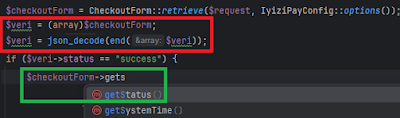
  21. The biggest sin in terms of productivity was not using any IDE. I couldn't believe anyone could work that way in 2023! This means no static analysis feedback for errors like querying non existing database tables and no warnings for bad practices like using non-traceable magic methods. No feedback for unused methods littering the source code. No ctrl+click navigation to method definitions, no automatic refactoring. Everything had to be done with ctrl + f text search which made refactoring extremely tedious.
  22. Another serious side effect of not using an IDE was not being able to get the benefit of autocomplete for methods existing in a class (or one of its ancestors), which in turn led to using primitive but complicated ways of extracting data from an object. Example code below shows data processing (red) instead of just using the relevant object method (green):
  23. Magic methods were used extensively, which meant that it wasn't clear whether a method existed in a class or not. One had to perform text search of the all the files to verify. There were many cases were the method did not exist or input parameters were wrong! The only reason it did not fail is due to that code path not being triggered yet.
  24. CSS bloat (109 CSS files!) made it difficult to find the root cause of a style not behaving as expected. Examples: Not being able to increase the width of a textarea despite setting width: 100%. Adding a required attribute to a checkbox does prevent form submission on button press but it does not show standard error message when checkbox is not selected.
  25. PHP version was 7.3, which masked lots of errors. For example, a typo in a statement that sets a property could go unnoticed because PHP silently allows all dynamic properties.
  26. Instead of solving warnings shown even by PHP 7.3, like "Undefined array key", warnings were muted with a custom error handler.
  27. Instead of using namespaces to avoid class name collisions, long class names like ModelCommonConfig were used.
  28. For most database tables, the older MyISAM (no foreign keys support) storage engine was used instead of the newer InnoDB (used as default in MySQL since 2010).
  29. For many-to-many relationships, serialized strings were used to store multiple values in a single MySQL column instead of pivot tables, decreasing efficiency due to need of deserialization and the database engine not being able to optimize searches. It also made the code difficult to understand.
  30. Insufficient logging: There are only CPanel's error_log and connection logs using a simple text file instead of using an existing library like log4php.
  31. There were no automated tests. Whenever you update the code, you have to think of a good set of test cases and carry them out manually which results in much less testing than would be necessary.
The sole reason these issues haven't led to a crisis yet is the website's relatively low traffic volume. Presently, the founder is seeking investment. Post-investment, intensive marketing is planned, which is expected to result in significant traffic spikes. 

I didn't have the luxury of re-writing the site from scratch because it was live with paying users and urgent fixes were needed. Since there was no requirements/design document to guide me and my web skills were limited, a full rewrite would have taken months in the best of conditions. I focused on incremental improvements and documentation. My technical actions in the past 6 months:
  1. Rather than using the demo folder on the server, I configured the code to run on my local machine and tested it there. This approach was significantly faster than repeatedly updating files on the server for testing every time I made a change.
  2. Created a private GitHub repo and used it for issue tracking too. I still have to manually copy my changes to the server after I verify them locally.
  3. Started using the PHPStorm IDE and correcting errors and warnings pointed out by its static analyzer.
  4. Wrote documentation, detailing general workflow and how to install development environment locally. I employed interns who found it challenging to understand the project, which underscored the mostly unnecessary complexity of the application. However, my documentation facilitated their onboarding process.
  5. Started doing weekly manual backups of database SQL file and image folder to my local computer so that when the server is hacked or some corruption occurs, the site can be restored from my local backup, with a data loss of at most 1 week. Of course, this is a short term solution, an automated, more frequent and cloud based solution has to be implemented.
Plans for 2024:
  1. Delete unused database tables and related source code.
  2. Get rid of all magic method calls.
  3. Get rid of all unused code, probably more than 90% of existing code will be deleted.
  4. Separate index() methods into separate POST handling methods.
  5. Move duplicate code into static functions, which will decrease the code by another 90%. In the end, I expect the code to be 1% of its original size.
  6. Remove rarely used features from admin and vendor panels.
  7. Improve documentation.
  8. Get rid of CSS bloat.
  9. Get rid of unnecessary components like CKFinder.
  10. Add analytics to the admin panel for metrics that cannot be collected by Google Analytics, like cities of vendors, cities to which products were shipped.
  11. Add 2 factor authentication to CPanel login.
  12. Automate incremental backup to first local PC, then the cloud.
  13. Simplify the page rendering sequence of operations. Convert pages that rarely change into static ones, so that they don't need to load content from the database.
  14. To prove ease of migration, verify that you can host website on your own hobby server.
  15. Switch to PHP 8+ to get more feedback / support from the language instead of silently masking problems as was the case with PHP 7.4.
  16. Use mature framework like Laravel or aimeos.
  17. Switch to API-centric architecture for communication with planned mobile app. Build the initial version of mobile app for iOS and Android. Use React to have single code base for web app and planned mobile app.
Plans for 2025+: 
  1. Use test automation, CI/CD (dev-test-live environments) for verifying changes in GitHub and deploying to live server if all tests pass, without any manual file copying. Unit tests are particularly important for an interpreted language such as PHP, where the absence of a compiler, unlike in compiled languages like Java or C++, means that even simple syntax errors are only caught during testing, or worse, in production.
My advice for people who want to start an online marketplace:
  1. For a quicker time-to-market, use a platform like Sharetribe. You can launch your initial version in just one day, without any coding, rather than spending several months! Once you passed the idea validation and MVP phases with the free plan (0$) and you live in a country were Swipe or PayPal is not available (e.g. Türkiye), to enable money transfers, you have to get help from a software freelancer to write code for payment gateway (e.g. iyzico) integration and host the custom code on your own server. Note that either you have to understand the basics of server maintenance or you have to pay an engineer's retainer. Your costs would be a one time fee for user interface / graphic design, payment gateway integration and server setup, 300$/month for Sharetribe yearly subscription, 20$/month for server hosting (assuming you do the server maintenance). You would also need to budget for insurance and taxes (~200$ for Türkiye) and marketing (>100$/month) because word of mouth won't probably be enough. For the first year, you need at most 8K$. Assuming your commission rate is 20%, if you can generate approximately 40K$ a year in revenue, you would be at the break-even point and potentially become attractive for outside investment (if you have collected metrics). When you reach this milestone, which might take a couple of years, you might consider quitting your day job and dedicate yourself full time to your marketplace business.
  2. For Türkiye, you might also consider using WordPress hosting, which has a regular price of 20$/mo, 6X cheaper than VPS hosting with CPanel for 120$/mo regular price. You can use WooCommerce and iyzico payment plugins for payments in Türkiye to get started. If you want custom code, you have to write them as WordPress plugins. If you can install your own web server and WordPress without any admin panel, i.e. self-host your web app, you could get away with 5$/mo for VPS and 20$/year for domain name. Just ask chatGPT: "Steps to self host my e-commerce web app with https and wordpress on a linux VPS, buy a domain name, and point it to my VPS IP"
  3. If you choose not to use an existing platform and prefer custom development, be prepared for at least a three-month commitment and significant financial investment. If you're not familiar with software development, find a trusted individual with relevant experience to assist you. This person may not write the code themselves, but they can help manage the development process. When selecting a software agency, if they don't use an IDE, don't even consider working with them. If they do, ensure they also use standard frameworks (e.g. Laravel for PHP. See Udemy marketplace build course, aimeos open source), rather than their own. In fact, you can use this blog as a software agency maturity evaluation checklist. Otherwise you will end up with an unmaintainable mess and all your efforts up to that point may go to waste.